Human Body - A visual guide

0 comments


Most of the people in the world which are not related to medical field don’t know much about the organization, action and maintenance of human body. This book is really an incredible visual guide which covers all the structural parts of the human body.

The author has divided this book into 3 parts as:
1. Organization
2. Action
3. Maintenance

In the first part of the book the starts by elaborating the life style of different tribes. After that the organization of the cells, organs, skin, hair, instructions and multiplications etc. are defines with their visual impacts.

The second part of this book shows the actions performed by different parts of our body. In this portion the author very well show and describe the actions and structure of our skulls, joints, muscles, hands and reflexes. All basic senses are also described in this portion. Moreover the he also described how our body language varies by our modes.

The last part of this book represents the maintenance of our body as it shows the blood, its circulation in our body and how heart pump our blood to make it possible to reach different parts of our body. You will also see the treatment and spare parts at the end of this book.
If you want to read the full book you can free download it from the below link:


www.dozenfiles.com


for more educational Ebooks stay tuned to CooLStack.

Top 10 Most Expensive Domain Names Sold

0 comments
Domain names are used as identification labels to indicate control of a resource. If you own a website you must need a domain to host your site on a server. Now a days different companies are selling domain names at different cost. Some domain are very cheap which some are very expensive.

Moreover the business of reseals domains also known as “Domain aftermarket” is also at its peak now a days. Various factors influence the market value of a domain name. Most of the million dollar domain deals are carried out privately and go unreported.

1. VacationRentals.com


Top 10 Most Expensive Domain Names Sold

                                        Sold for   $35 Million

2. PrivateJet.com


Top 10 Most Expensive Domain Names Sold

                                        Sold for   $30.18 Million

3. InSure.com


Top 10 Most Expensive Domain Names Sold

                                           Sold for   $16 Million

4. Sex.com

     Sold for   $13 Million

5. Hotels.com


Top 10 Most Expensive Domain Names Sold

                                            Sold for   $11 Million

6. Fund.com


Top 10 Most Expensive Domain Names Sold

                                        Sold for   $9.99 Million

7. Porn.com

      Sold for   $9.5 Million

8. Fb.com


Top 10 Most Expensive Domain Names Sold

                                       Sold for   $8.5 Million

9. Business.com


Top 10 Most Expensive Domain Names Sold

                                     Sold for   $7.5 Million

10. Diamonds.com


Top 10 Most Expensive Domain Names Sold


                                       Sold for   $7.5 Million

Top 10 Hidden Google Search Tricks

0 comments
Google is the most popular search engine in the world. It is a huge search engine produces millions of search results in seconds. Besides Searching, Google also provides other kind of services like social networking, mails, maps, books, news and hundreds more.

Top 10 Hidden Google Search Tricks


Since the beginning, we’ve focused on providing the best user experience possible. Whether we’re designing a new Internet browser or a new tweak to the look of the homepage, we take great care to ensure that they will ultimately serve you, rather than our own internal goal or bottom line. Our homepage interface is clear and simple, and pages load instantly, said by “Google”.


Many Google services are hidden. Every people doesn’t know. But here we going to show you Top 10 Google hidden search tricks. You can try for fun.

1. Google Underwater

Top 10 Hidden Google Search Tricks


With the help of this secret Google trick you can view the underwater version of Google. To try Google underwater, go to Google home page and type Google Underwater in search bar and press “I am feeling lucky”.

2. Google Hacker

Top 10 Hidden Google Search Tricks


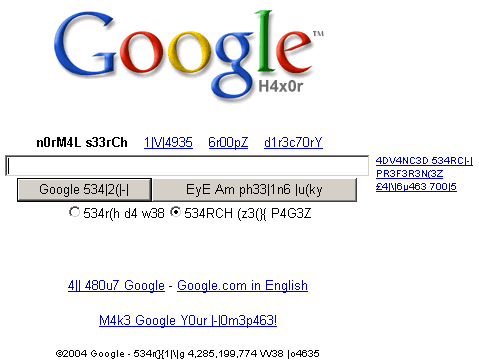
If you know hacking then you probably know about the hacker’s community language. Hackers use leet language, which is an alternative alphabet for English language. For example, they write shopping as $h0pp1n9. Leet language is a trend in hacker’s community. If you want to use Google’s leet version then go to google.com and type Google hacker. Now press “I am feeling lucky” button to start using Google in leet language.

3. Dark Google

Top 10 Hidden Google Search Tricks


You can change the background of Google to black color. To try this secret google trick, go to Google home page and type Dark Google. Then press “I am feeling lucky” button.

4. elgooG

Top 10 Hidden Google Search Tricks


Do you want to see, how Google search results look in the mirror..?  If yes, then do not worry.
To check the mirror version of Google, open user Google page and just type elgooG and press enter.

5. Google Sphere

Top 10 Hidden Google Search Tricks


Do you want to see Google moving like a globe? If yes, then you must try this awesome Google Sphere Easter egg. To try, just go to google.com and type Google Sphere in search field. Then press I am lucky button.

6. Do A Barrel roll

Top 10 Hidden Google Search Tricks


This Easter egg is used to give Google search results a 360-degree spin. To Try this go to google.com and type Do a Barrel roll.
Then press I am luck button to see a 360 degree spin to Google search results.

7. Zerg Rush

Top 10 Hidden Google Search Tricks


If you want to chew up Google search result then this Google Easter egg can do it for you. To try this Secret Google trick then go to Google.com and Type Zerg Rush and press enter.

8. Google Gravity

Top 10 Hidden Google Search Tricks


Do you want to see the effect of gravity on Google homepage as well as on search results? To try this go to Google and type Google Gravity in search bar. Now press “I am feeling lucky” button to see the Google homepage falling down. Even after this make a search, you will see that search results are also falling.


9. Google Terminal

Top 10 Hidden Google Search Tricks

This Google Easter egg will show you the terminal version of Google. To try Google as command prompt terminal, just go to Google home page and type Google Terminal. After that, press “I am feeling lucky” button to see the Google trick.

10. Google Pacman

Top 10 Hidden Google Search Tricks


This is a Google doodle trick which helps you to play Pacman on Google’s homepage. To try this Google doodle trick, go to google.com and type Google Pacman and click on “I am feeling lucky” button.

Top 10 Best Question and Answer Websites

0 comments
Do you have any question……? Or do you want to ask a question…? Or sometimes you can’t find a valid answer to your question. You do not need to worry because these are a lot of websites and form on which you just post your question and the experts or any other user will suggest you the answer. Now what you have to do is just to pick the answer which fulfills your requirements. I am going to list top 10 question and answer websites which are not only famous but also considered as patent regarding their contents. Do visit these websites if you have any problem.

Top 10 Best Question and Answer Websites


1. Yahoo!Ansawers

Top 10 Best Question and Answer Websites

Yahoo! Answers is a community-driven question-and-answer site or a knowledge market launched by Yahoo! on June 28, 2005 that allows users to both submit questions to be answered and answer questions asked by other users. The site gives members the chance to earn points as a way to encourage participation. Yahoo! Answers is available in 12 languages, but several Asian sites operate a different platform which allows for non-Latin characters. The platform is known as Yahoo! Chiebukuro in Japan and as Yahoo! Knowledge in Korea, Taiwan, China, and Hong Kong.

2. Answers.com

Top 10 Best Question and Answer Websites

Answers.com is an Internet-based knowledge exchange, which includes WikiAnswers, ReferenceAnswers, VideoAnswers, and five international language Q&A communities. The website is the primary product of the Answers Corporation. The site supports English, French, Italian, German, Spanish, and Tagalog. 

3. Wiki Answers

Top 10 Best Question and Answer Websites

WikiAnswers is an ad-supported wiki-based website where users can submit and answer questions. This site allows users to post and edit questions and answers. WikiAnswers.com uses wiki technology and allowing editing of content. All the questions that have an answer can be edited and improved over time. WikiAnswers.com uses an Alternates System – where every answer can have dozens of different questions that "trigger" it. When a question is similar to an existing one, they are joined as alternatives. This helps prevent duplicate entries in an effort to promote more cohesive answers.

4. Askville by Amazon

Top 10 Best Question and Answer Websites

Askville is designed to run much like a computer game. Users gain or lose "experience points" in particular topics as they answer questions in those topics, depending on how good their answer is. Users also receive "quest gold" by asking and answering questions, and by voting on the worth of other people's answers. In the past, these coins could be redeemed for items in an Askville store. There are a variety of topics for questions, many user created. Besides answering factual and opinion questions, members can help others identify a book remembered from childhood or find a special recipe.

5. AOL Answers

Top 10 Best Question and Answer Websites

AOL Answers is a proactive social search service which groups questions and answers to any topic and allows users to cooperate on them. Any question is allowed on AOL Answers, except ones that violate the AOL Answers terms of use.

6. Answerbag

Top 10 Best Question and Answer Websites

Answerbag is a collaborative online database of frequently asked questions, where questions are asked and answered by users. Multiple answers to a given question are presented in descending order of user ratings. In a comparison with Yahoo! Answers and MSN Live Q&A, Cnet declared that Answerbag was neck and neck with Yahoo! Answers.

7. Fluther.com

Top 10 Best Question and Answer Websites

Fluther is a free question-and-answer (Q&A) website with some of the features of a social networking website. Users submit questions to the user-base and answer questions posed by others. It is intended to be a resource for those looking to either solve a problem or generate a discussion. Once submitted, questions are routed toward users that may be able to answer them. In turn, users are encouraged to answer questions relevant to their own fields of expertise.
  

8. Stack Overflow

Top 10 Best Question and Answer Websites

It features questions and answers on a wide range of topics in computer programming. The website serves as a platform for users to ask and answer questions, and, through membership and active participation, to vote questions and answers up or down and edit questions and answers in a fashion similar to a wiki. Users of Stack Overflow can earn reputation points, badges and can receive badges for their valued contributions, which represents a kind of gamification of the traditional Q&A site or forum.

9. Qoura

Top 10 Best Question and Answer Websites


Quora is a question-and-answer website created, edited and organized by its community of users. The company was founded in June 2009, and the website was made available to the public on June 21, 2010. It aggregates questions and answers to topics. Users can collaborate by editing questions and suggesting edits to other users' answers.

10. WebmasterQuery

Top 10 Best Question and Answer Websites

WebmasterQuery is also free question-and-answer (Q&A) website. You can ask any question about any field. Moreover in order to motivate users it also gives points which added in their accounts.

You can gain a bunch of knowledge from the above given websites and find perfect answers as well. The reason is that most of the time you will see answers given by highly qualified professional of the respective fields therefore don't worry about their answers. An answer to you question might not satisfies you but it may be useful for the others. I have also gained help from Stack Overflow regarding programming and used other sites as well. I hope these sites will enhance your knowledge and abilities. Do share if you like and give us feedback. CoolStack always strives to provide you some cool information.

How to Hack Facebook Account

0 comments
Facebook is the biggest and most popular online social networking service today. It has over 1.15 Billion users across the world. However along with the growing users and popularity, it is also gaining a wide attention of hackers as well.  There are many ways to hack a Facebook account. Some of them are Keylogging and Phishing and many more. However these are the general methods that are used by professional hackers. Now today I am going to show you how to hack the Facebook account of a person whose facebook name you know.

How to Hack Facebook Account


By this method you can hack the password of your friend’s (or any one) account using Facebook’s security system. Before that start you should have to create atleast 3 fake accounts on Facebook and get them add in the account of any one you want to hack. This is the msut requirement of this method and make sure you have access to all 3 fake accounts.
Now lets start to hack any friends account. :)

Step 1:

Open the web page www.Facebook.com and click on “Forgot Facebook Password” button. 

How to Hack Facebook Account


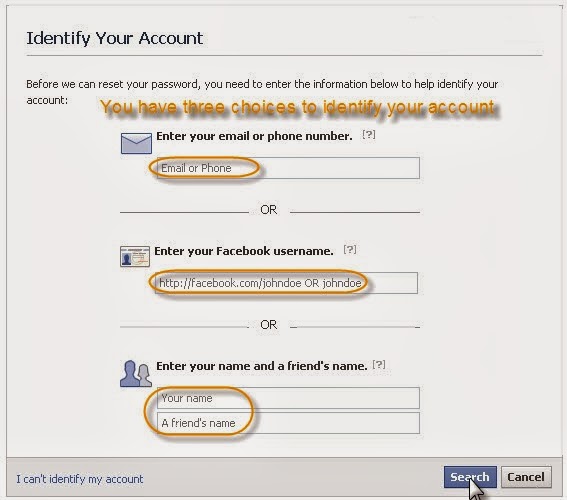
You will be presented with three options to recover the password of the Facebook account.


Choose any one of these options. First option needs you to fill email address of your friend whose account you want to hack. Otherwise you can choose second option by filling the username for your friend in it. Also there is third option available where you need to enter the name of the victim friend and your own name

Step2:

Next you have to click on the Search button.
If all above steps are followed properly then you will be able to see the profile picture of your victim friend. Confirm this step by hitting “This Is My Account


Step 3:

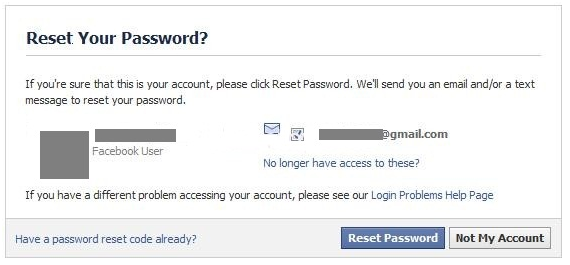
Now the interface will show you option to recover password using the email id of your friend. You have to click on “No Longer Have Access to These” link.

How to Hack Facebook Account


Step 4:

Next enter a totally new email id in the form provided. Make sure that the email address should not be associated with some other Facebook account. click on the Submit button.


Step 5:

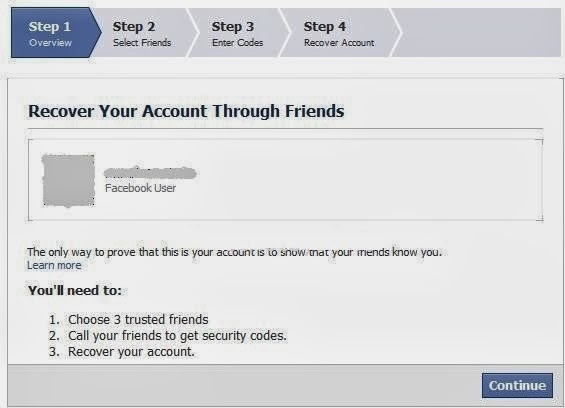
Now you will be provided with the option to answer the security question set up by your friend or actual owner of that Facebook Account. If you can guess the right answers to the security question then it’s a big advantage otherwise you need to enter the wrong answer for three times. After entering wrong answer for three times you will be taken to the following page.


Here you need to choose the name of three friends that are on your Facebook friends list. These should be those 3 fake accounts that you have created in the very beginning. Now click on Continue button to advance to the next step.

Facebook system will send security codes to all of those three accounts chosen in previous step. Now login to each of those 3 fake accounts and get the security codes from there and get them filled in the form offered by the Facebook.


The last action taken by Facebook will be to direct a Password reset email to the new email address entered by you above from where you can reset the password and will gain complete access to your friend’s Facebook account.

Now start hacking and keep visiting CooLStack.

How to Create a Cluster (LinuxOS) - Easy Steps to create Cluster

0 comments
In my previous post of "How to Install CentOS in VMware Workstation", now I am going to write steps of "How to Create a Cluster in LinuxOS". The following are the easy steps to create a cluster but be-careful while typing commands because these are case-sensitive and also care about spaces between commands because they also matter.

Easy Steps to create Cluster


Now first make a check list of our steps as given below and we  start doing these steps...................

1: Linux Installation in Nodes
2: SSH equivalence establishment for user root
3: SSH hostkeys collection
4: Setup NTP service
5: Installation of PDSH
6: Setup NFS (Optional)
7: Creation of ordinary user, and also setup SSH equivalence for that
8: Installation of prerequisite packages (GCC, G77 etc)
9: Installation of MPI
10: Compiling Linpack (Optional)

You may also like ::: How to Install CentOS in VMware workstations


Step 1:            

Installation of Linux on all nodes

Step 2:            

Working on Master Node
Start with hosts file
Vi /etc/hosts

127.0.0.1                              localhost.localdomain localhost
10.0.0.20                              masternode
10.0.0.21                              node1
10.0.0.22                              node2

Copy Hosts file on node1 and node
For Node1
Scp /etc/hosts node1:/etc/
Are you sure you want to continue connecting (yes/no)? yes
Node1 Password will be required
For Node2
Scp /etc/hosts node2:/etc/
Are you sure you want to continue connecting (yes/no)? yes
Node2 Password will be required

Step 3:            

Key Generation Process
ssh-keygen –t dsa
Just press enter on all steps
ssh-keygen –t rsa
Just press enter on all steps
Go on the directory and verify the generated keys files
cd .ssh/
ls –l
Following files has been generated:
id_dsa
id_dsa.pub
id_rsa
id_rsa.pub
known_hosts

Generate authorized_keys in ssh directory
cat *.pub >> authorized_keys

Copy these files on Node1 and Node2
cd ..
For Node1
scp –r .ssh node1:/root/
Node1 Password will be required
For Node2
scp –r .ssh node2:/root/
Node2 Password will be required

Generate Nodes ssh finger prints (Not need for mpiuser)
ssh-keyscan –t dsa masternode node1 node2 > /etc/ssh/ssh_known_hosts
ssh-keyscan –t rsa masternode node1 node2 >> /etc/ssh/ssh_known_hosts
Now you can view the generated file using
less /etc/ssh/ssh_know_hosts

Copy this file on Node1 and Node2, Note that will not ask for the password this time because the public key has already attached or certify on the other side.
scp /etc/ssh/ssh_known_hosts node1:/etc/ssh/
scp /etc/ssh/ssh_known_hosts node2:/etc/ssh/

Now test with login on the other nodes
ssh node1
Run the command on other nodes
ssh node1 uptime 

Step 4:            

Setup NTP service
vi /etc/ntp.conf
disabled the following lines:
#server 0.fedora.pool.ntp.org dynamic
#server 1.fedora.pool.ntp.org dynamic
#server 2.fedora.pool.ntp.org dynamic
enabled the following lines:
server   127.127.1.0                         # local clock
fudge    127.127.1.0         stratum 10
service ntpd restart
shutting down ntpd:                                                       [FAILED]
starting ntpd:                                                                     [OK]

ntpq –p –n

Step 5:            

Installation of PDSH (pdsh-2.18-1.src.rpm)
Recompile it
rpmbuild --rebuild pdsh-2.18-1.src.rpm
change directory
cd /usr/src/redhat/RPMS/i286/
rpm –ivh pdsh-*

vi /etc/machines
masternode
node1
node2

pdsh –a date
pdsh –a ntpq –p –n

Step 6:            

Setup NFS
vi /etc/exports
/cluster ^(rw,no_root_squasn,sync)

service nfs restart
chkconfig --level 35 nfs on
pdsh –a mkdir /cluster
service nfs restart

mount –t nfs masternode:/cluster /cluster/
df –hT

vi /etc/fstab
At the end of this file, add following line:
Masternode:/cluster                      /cluster nfs          defaults               0 0
               

Step 7:            

Creation of ordinary user, and also setup SSH equivalence for that
[group: mpigroup-600, user: mpiuser-600, member of mpigroup, /cluster/mpiuser]
groupadd –g 600 mpigroup
useradd –u 600 –g 600 –d /cluster/mpiuser mpiuser
perform above commands on all nodes

Step 8:            

Installation of prerequisite packages (GCC, G77 etc)
rpm –q gcc
rpm –qa | grep g77
yum list | grep g77
yum –y install compat-gcc-34-g77
pdsh –w node1, node2 yum –y install compat-gcc-34-g77

Step 9:            

Installation of MPI
su – mpiuser
generate ssh keys repeat step-3

Download MPI from (http://www.mcs.anl.gov/research/projects/mpich2/downloads)
Mpich2-1.0.8.tar.gz and copy on cluster directory

Goto on root user and execute the following commands:
chown mpiuser:mpigroup /cluster –R

goto cluster directory using mpiuser
Unzip the following mpi file
tar xzf mpich2-1.0.8.tar.gz
cd mpich2-1.0.8
./configure --prefix=/cluster/mpich2
make
make install

setup some environment variables
Goto Home Directory
cd
vi .bash_profile

PATH=$PATH:$HOME/bin:/cluster/mpich2/bin
LD_LIBRARY_PATH=$LD_LIBRARY_PATH:/cluster/mpich2/lib
export PATH
export LD_LIBRARY_PATH

source .bash_profile
echo $PATH

which mpd
which mpiexec
which mpirun

cat >> /cluster/mpiuser/mpd.hosts << EOF
> masternode
> node1
> node2

vi /cluster/mpiuser/mpd.hosts
remove the masternode and save it

vi /cluster/mpiuser/.mpd.conf
secretword=redhat

mpd &

chmod 0600 /cluster/mpiuser/.mpd.conf

ps aux | grep mpd

mpd &

mpdtrace
mpdtrace –l
mpdallexit
mpdboot –n 2 –chkuponly

mpdboot –n 2
mpdtrace

For checking that your cluster is successfully created run the following example

cd /cluster/mpich2-1.0.8/examples

mpiexec –n 3 ./cpi

how to compile the program of MPI

mpicc –o icpi icpi.c

Now we have successfully created the cluster on CentOS which we have installed in VMware. Now you are able to perform your codes in virtual machines.
I hope you have gained much from this post. Give us feedback and keep visiting Cool Stack.

How to Download Videos from YouTube without any Software

0 comments
YouTube don’t provide the facility of direct download. We have to use a software to download our desired video. The software that we often use is IDM and it’s available only for 30 days trail version. There you have to choose another software after 30 days. 


Now it’s possible to download a video from YouTube without any software by following easy steps;

Step 1
Open the video on YouTube you want to download.

How to Download Videos from YouTube without any Software

Step 2 
Now change the "youtube" from url to "voobys" as you see in the below pictures

How to Download Videos from YouTube without any Software

now see how i changed......

How to Download Videos from YouTube without any Software

Step 3
After "voobys" instead of "youtube", now a window will appear probably you will land on Voobys page. In this page you will see your video with quality options to download. Select the quality option in which you want to download your video. 

How to Download Videos from YouTube without any Software


Step 4 
After selecting an option a window box will appear as follows

How to Download Videos from YouTube without any Software

select the run  option your video will start to download.

Be-careful

Don't click on any other download option in voobys page as 

How to Download Videos from YouTube without any Software

because these are advertisements not the download options.

Now start downloading your desired video from youtube and keep visiting CooL Stack.